
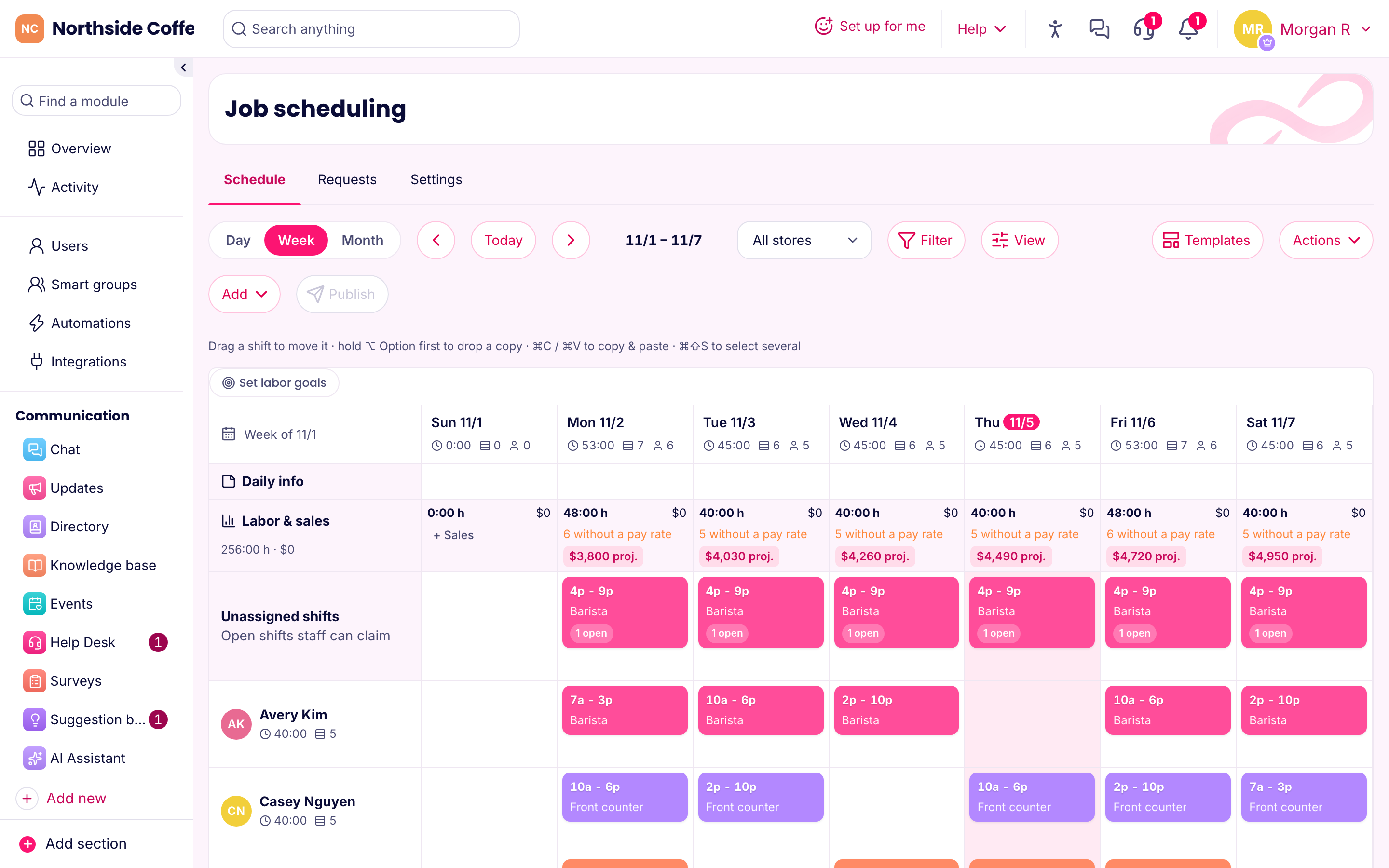
What makes restaurant scheduling hard
A restaurant has the worst scheduling problem around. Saturday night and Tuesday lunch need completely different crews. Half the team is in school. Someone always texts at 3 p.m. saying they can't come in at 5. Labor is one of your largest costs, and a bad week of it can wipe out your margin.
Here's how you'd run that in PinkLinq.
Build the week from your sales
The schedule shows hours and labor cost next to sales for each day. Type in your projected sales, or let the forecast fill them in from the last four weeks. Then set a labor goal, such as 28%, or a sales-per-labor-hour target. Any day over the goal turns red, and each day shows how many hours its sales can carry.
So you see Tuesday's problem on Sunday, while you can still cut a shift. Not sure what your number should be? Try our labor cost calculator.
Copy last week as your starting point, or save templates for a normal week and a holiday week.
When someone calls out
Post the shift as open. Your team sees it on their phones and can claim it, and you approve. Swaps work the same way: an employee offers a shift, a colleague takes it and you sign off. You're not working through your contacts during the dinner rush.
Clopens, breaks and minors
These are the common restaurant traps:
- Clopens. Set a minimum rest between shifts, and the app flags anyone closing at midnight and opening at 7 a.m. Some cities require a set rest period by law. More on clopens.
- Meal and rest breaks. Pick your state and missed breaks get flagged on the schedule and timesheets.
- Minors. Hosts and bussers are often under 18. Add a birthday, and shifts that run too late or too long get flagged.
- Overtime. "Heading into overtime" lists anyone whose worked and scheduled hours will cross the line this week.
Clocking in without phones on the line
Phones and kitchens don't mix. Mount a tablet by the back door, pair it as a kiosk and have people clock in with a PIN. It costs nothing extra. Front-of-house managers can use their phones, and you can set the rule for each person.
Pre-shift notes that reach everyone
Post the specials, the 86 list or a menu change as an update, and see who's seen it. Mark it important when it has to be read, such as an allergy change, and people have to confirm. A short quiz after a menu change tells you who really knows it.
Opening, closing and food safety
Build opening and closing checklists with photo proof where you need it, and log fridge temperatures as a number on a form. Every entry's dated and shows who made it, and it's all there when an inspector asks. Track food handler cards as documents with an expiry date, so a lapsed one doesn't catch you out.
Training that doesn't take a manager off the floor
New servers can learn the menu on their phone before their first shift. Film your best line cook explaining the plating, and it's a course in ten minutes. Add a quiz with a pass mark.
What we don't do yet
We'd rather tell you now:
- Tips. We don't calculate or distribute tips. If tip pooling is central to your payroll, look at a specialist like 7shifts.
- Live POS sales. Sales forecasts come from numbers you type in. We don't pull them from your register yet.
- Running payroll. We give you a file of approved hours for Gusto, ADP, QuickBooks, Paychex or Square.
What it costs
A single location with up to 10 staff is free, with everything. For a typical restaurant of 25 with schedules, the clock and chat, it's $29.00 a month billed yearly. A three-location group of 60 pays $48.50, because we charge per hub and not per location.